Introducing a new local search experience across your devices

Posted by Unknown Senin, 05 Maret 2012 0 komentar
(Cross posted on the Inside Search Blog)

How often are you doing a Google search from your computer to find information about a place before going there? Now, next time you go to Google.com on your Android phone or iPhone, information about that place will be conveniently available under the new “Recent” icon. Calling, getting directions or seeing details about the places you just searched for is now only one tap away.

We provide this new convenience feature for users who have Web History enabled and are logged into Google when doing their search. Start by searching for a place on your PC or other devices, then login to Google.com’s mobile homepage and check the Recent icon. Information about previously searched places will be available under the Recent icon for about three days (time available extended from 24 hours on March 21).
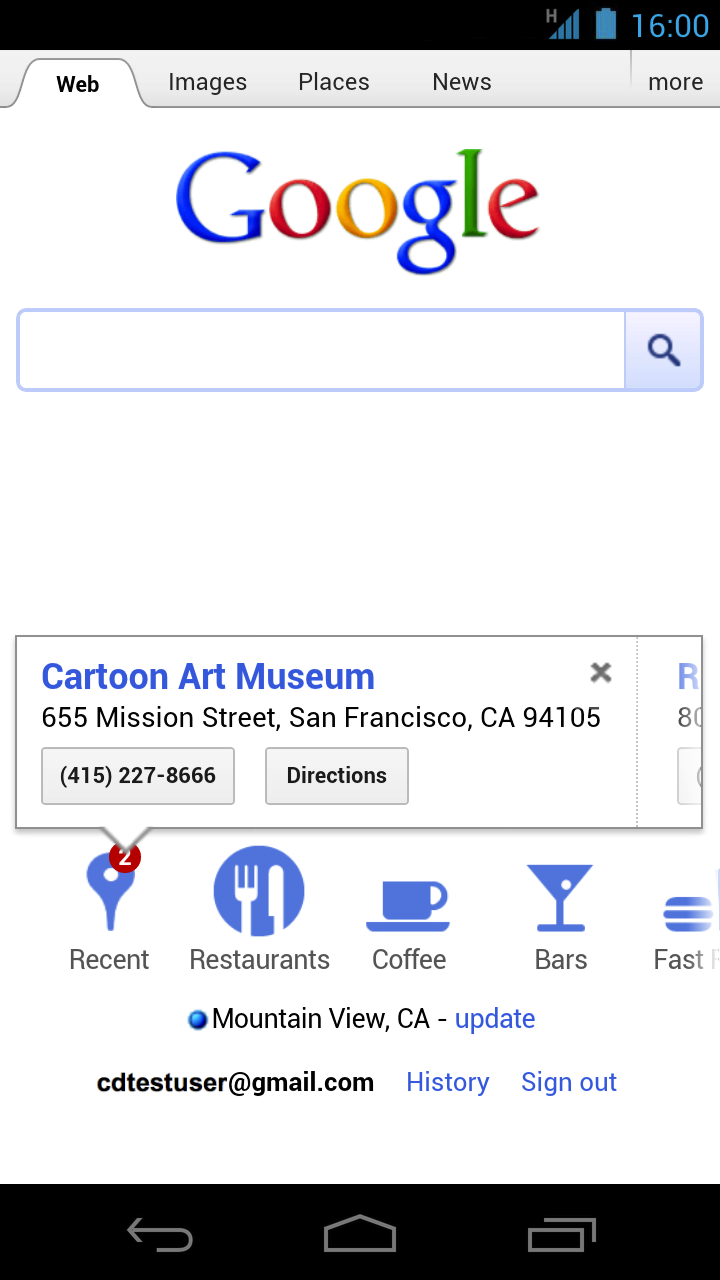

The new “Recent” icon shows information about places you have recently searched for on any of your devices. Try swiping to the right to see more icons for other categories of places.

Next time you are heading to a place you have recently searched for, no need to worry if you can’t remember the address or phone number. Just go to Google.com on your smartphone and tap on the “Recent” icon. We hope you find this new feature useful!


Baca Selengkapnya ....

How To flash Beats Audio Success Port To All Samsung Android 2.3 Smartphones

Posted by Unknown Sabtu, 03 Maret 2012 0 komentar
Why Beats Audio?
-The sounds will be more natural, playing with more clarity.


How To flash Beats Audio ?

1. You need to root your phone. Click here to root if you havent root yet.

2. You also need to install CWM. Click here to install CWM if you havent.
    Make a backup just in case.


3. Download flash.zip :
Mediafire  |  UFile


4. Copy flash.zip to USB Storage.


5. Turn off your phone and boot in CWM (Hold Volume up + Home button + Power button and release Power button after samsung logo appear) [It maybe different for some phone].


6. Choose flash.zip from sdcard.


7. After that, reboot your phone and you Done.

Baca Selengkapnya ....

How to install Custom Boot (bootanimation) for Rooted Phone

Posted by Unknown 0 komentar
Warning: I am NOT RESPONSIBLE if you brick your phone..
Do this under your own risk


1. What it custom boot/bootanimation?
The flashy image when u boot up (power on) your phone.

2. Need root access to change it?
OF COURSE!! Click here to root if you haven't root your phone

3. How to change it from default Samsung (booring) bootanimation?

  • Dload any bootanimation you wish with 480x800 pixels size from web like this one.
    Click here to go to that site
  • Rename it to sanim.zip (Remember to use small letter 's')
  • Transfer to phone, copy/paste inside system/media. Replace (or backup 1st) original sanim.zip.
  • Reboot.

4. Is there any EASIER way?
I use app 'absolute system'. You want the link? http://lmgtfy.com/?q=absolute+system.apk

5. It didn't change!!!
Because by default that app use bootanimation.zip. It need to be renamed to sanim.zip. Didn't I just told u above?

6. How?
  • Open root explorer, backup original bootanimation & samsungani at system/bin
  • Download booting.zip .You will get 2 files.
  • Download booting.zip - Mediafire  |  UFile
  • Replace the files at system/bin.
  • Change permission to Executable
    Permission should be rwxr_xr_x (r=read, w=write, x= executable)
  • Download any desired custom boot, rename it to sanim.zip
  • Copy sanim.zip to /system/media

7. My custom rom disabled custom boot (for faster boot time). I want to try this..
  • Manually, using root explorer.. go to /system. (Check permission to mount r/w)
  • Use any editor and edit build.prop
  • find debug.sf.nobootanimation = 1
  • Add # in front of the line so it become # debug.sf.nobootanimation = 1

8. I hate the annoying custom boot sound. How to disable it?
  • using root explorer go to system/etc
  • Find PowerOn.wav and rename it as PowerOn.wav.bak
  • Create new folder and name it as PowerOn.wav

Baca Selengkapnya ....

How to flash/install CUSTOM ROM for Samsung Galaxy W GT-I8150

Posted by Unknown Jumat, 02 Maret 2012 0 komentar
Before you can flash/install CUSTOM ROM for Samsung Galaxy W GT-I8150,
You need to :
1. Root your phone. Click here to root if you haven't yet.
2. Install ClockWorkMod (CWM). Click here to install it if you haven't yet.


How to flash/install CUSTOM ROM for Samsung Galaxy W GT-I8150 :

1. Download the rom you want to flash. Example: you can download this one.
2. Copy the zip file (the rom) to the USB Storage. If you downloaded the file in parts, you need to extract it (using 7zip) into only 1 zip.
3. Boot into ClockWorkMod ( Press volume up+menu+power button and release power button when samsung logo appear. )
4. [Optional] Backup your current ROM using nandroid (just in case).
5. Install the zip file (the rom) [choose the rom in the sd card]
6. Restart your phone.
7. Done.

First boot after install a rom usually takes longer than usual. So, please patiently wait.

Baca Selengkapnya ....

Android@Mobile World Congress: It’s all about the ecosystem.

Posted by Unknown Senin, 27 Februari 2012 0 komentar

Each and every day, we are humbled by the trajectory of Android and our partners.

With a year-on-year growth rate of more than 250%, 850,000 new Android devices are activated each day, jetting the total number of Android devices around the world past 300 million. These numbers are a testament to the break-neck speed of innovation that defines the Android ecosystem.

Last year at Mobile World Congress (MWC), we announced that there were more than 150,000 apps in Android Market. That number tripled to more than 450,000 apps today, with over one billion app downloads happening every month. Think about the astonishing number of songs Shazam’ed, places Qype’ed and foursquare mayorships! To celebrate the hard work and success of our developer community, we’ve built special “app pods” into our Android stand at MWC. Many of these featured apps demonstrate the latest Android innovations, such as Android Beam, which lets you share content like web pages, videos, directions, and apps—just by touching two Android phones back to back.

The Android Stand on the eve of Mobile World Congress 2012

If you walk around the Android stand, it’s also evident that our hardware partners are thriving. There are 100+ devices on display at the conveyor belt bar, which is just a small portion of the 800+ Android devices that have launched to date. And what better sign of innovation than the Bling Bot—powered by the Android ADK—which can bedazzle your Galaxy Nexus backplate with perfect precision.

We’re just getting started at Mobile World Congress, so keep checking android.com/mwc and the +Android page on Google+ for updates.

Posted by Andy Rubin, SVP, Mobile and Digital Content


Baca Selengkapnya ....

How to swap and unswap memory in Samsung Galaxy W I8150

Posted by Unknown Sabtu, 25 Februari 2012 0 komentar
How to swap:

Before swap:
- Make sure you move all apps and games to phone memory (internal usb)
- Root your phone (Click here to root your phone)
- Install Root Explorer
Download Root Explorer :
Mediafire  |  UFile  |  Jumbofiles
- Make a backup folder in \sdcard
- Open root explorer, go to folder \system\etc
- Make a backup for vold.fstab file (copy vold.fstab file to your backup folder). Just in case.

Next:
- Download modified vold.fstab :
Mediafire  |  UFile  |  Jumbofiles
- Open root explorer
- Tick mount  R/W ( So that you can edit system file )
- Extract the content of the file that you download just now and overwrite original vold.fstab with the downloaded vold.fstab in the \system\etc folder.
- Tick mount  R/O
- Restart your phone and enjoy.


How to unswap :
- Open root explorer
Download Root Explorer :
Mediafire  |  UFile  |  Jumbofiles
- Tick mount  R/W [at top right] ( So that you can edit system file )
- Download original vold.fstab :
Mediafire  |  UFile  |  Jumbofiles
- Find the backup of the original vold.fstab and overwrite current vold.fstab with the original vold.fstab in the \system\etc folder
- Tick mount  R/O
- Restart


It should be like this when you successfully swap your memory:


Baca Selengkapnya ....

How to Root and Unroot Samsung Galaxy Wonder GT-I8150

Posted by Unknown 0 komentar
Why Root ? :

1. You can swap memory card with internal storage
2. You can install chainfire3D
3. You can overclock CPU
and More...


How to root ? :

Rooting with the auto-method(DoomLord v.3) (for Windowsuser)

- Download Kies - Then install it.
- Enable "USB DEBUGGING"  (Menu\Settings\Applications\Development)
- Enable "UNKNOWN SOURCES" (Menu\Settings\Applications)
- Then Connect Phone to PC(USB) and wait until all the drivers have been successfully installed

Next Step :--

- Download this Zip-File and extract all the files into a random folder.

- Run the runme.bat-file as Administrator and press any key.

- Now you will have to wait for 3-6 Minuten. The program will have to process all the necessary steps.

- If you get the message "ALL DONE!!!" you device should be successfully rooted.

- You may have to update Superuser via the Android market ->Menu-Button->My Apps Superuser ->  update.

Have fun with the root access!!!


UnRooting :

Automated unrooting DoomLord(for Windowsuser)

IMPORTANT: Only use this method if you have used the automated rooting method of DoomLord !!!

1.a On the Mobile: Got to Settings -> Applications -> Development -> and checkmark USB debugging.
1.b On the Mobile: Got to Settings -> Applications -> and checkmark Unknown sources.

2.Connect the device to your PC(USB) and wait until all the drivers have been successfully installed.

3. Download and install this Zip-file and extract all the files into a random folder.

4. Run the runme-UNROOT.bat-file as Administrator and press any key.

5. Now you will have to wait for 3-6 Minuten. The program will have to process all the necessary steps.

6. If you get the message "ALL DONE!!!" you device should be successfully unrooted.


If you cant root with this method, Try another method by CLICK HERE

Baca Selengkapnya ....
Trik SEO Terbaru support Online Shop Baju Wanita - Original design by Bamz | Copyright of android ipad.