YouTube Tests Unified Settings Control

Posted by Unknown Minggu, 11 Agustus 2013 0 komentar
YouTube tests a new version of the video player with a unified control for annotations, size, video quality and more.


I don't think it's a good idea to combine these settings because they become more difficult to find. Some player buttons show up only if they're useful (for example, the annotation button) and they let you disable feature with a single click. The unified control requires more clicks and doesn't show useful information at a glance.

{ Thanks, Yu-Hsuan Lin. }

Baca Selengkapnya ....

Changes to Chrome's New Tab Page

Posted by Unknown Jumat, 09 Agustus 2013 0 komentar
You might remember the experimental new tab page that has been tested by the Chrome team for many months. The new tab page will be replaced by a simplified version of the Google homepage, most of the features of the new tab page will be relocated, while the search box will be removed from the Google Search interface and replaced by the Chrome omnibox.

The latest Dev Channel/Canary releases show this box with information about the new tab page: "Changes to the New Tab page".

* Get the Google Doodle and other features of Google.com on any new tab you open.
* Use the Chrome menu to get your recently closed tabs from any site you're on.
* Access your Apps by clicking on the Chrome App Launcher icon in your Windows Taskbar or the Apps icon in the bookmarks bar.


It looks like the updated new tab page will be released in the near future and it will bring a lot of other changes: Chrome's app launcher, more packaged apps, a new Google Search interface without the search box and a new navigation interface for Google that uses the app launcher menu.

The 8 empty boxes from this screenshot are used to display the most visited pages. It's the only feature from the old NTP that has been preserved. There's an apps icon in the bookmarks bar that links to a page that displays your apps, while the recently closed tabs and the tabs from other devices are displayed in the Chrome menu, below the bookmarks.


Here's the special google.com interface for Chrome:


To try the experimental new tab page, paste this in Chrome's address bar: chrome://flags/, use Ctrl+F to search for "Enable Instant Extended API" and click "Enabled" in the drop-down below "Enable Instant Extended API". Then click "Relaunch now" at the bottom of the page to restart Chrome. To disable this feature, use the same instructions, but click "Disabled" instead of "Enabled".


{ Thanks, Yu-Hsuan Lin. }

Baca Selengkapnya ....

YouTube's Geeky Easter Eggs

Posted by Unknown Kamis, 08 Agustus 2013 0 komentar
YouTube has some cool Easter Eggs that are related to the Geek Week. Here are some of them:

* start playing a random YouTube video and then type 1980. You'll need to defend the video and "blow those missiles out of the sky".


* start playing a random YouTube video and then type 1337. Comments will be translated into the leet "language" and will look like this: "w0w th1z 1z pr3ttj $w33t".


* open this video and click the POW! button from the player. The video now looks like a comic.


* search YouTube for [Fibonacci] and you'll learn about Fibonacci sequences and the golden ratio from a YouTube animation that uses video thumbnails.


* search for [ponies] and you'll see some cute ponies that are running.


* search YouTube for [Use the Force, Luke] and you'll see a crazy animation.


* search YouTube for [Beam me up, Scotty] and you'll see a Star Trek effect. "'Beam me up, Scotty' is a catchphrase that made its way into popular culture from the science fiction television series Star Trek. It comes from the command Captain Kirk gives his chief engineer, Montgomery "Scotty" Scott, when he needs to be transported back to the Starship Enterprise."


This page shows all the Geek Week videos and a list of badges you can unlock. You need to find Easter eggs, take the Geek IQ test and watch videos to unlock all the badges. Follow YouTube's Google+ page for clues.


Baca Selengkapnya ....

Google Docs Shows Link Suggestions

Posted by Unknown 0 komentar
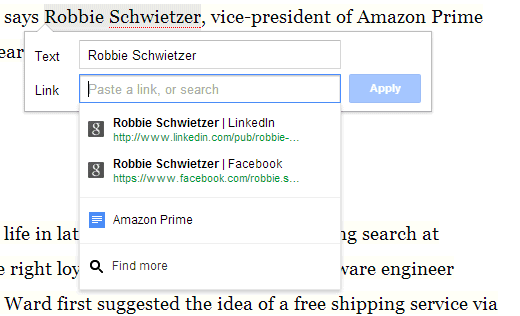
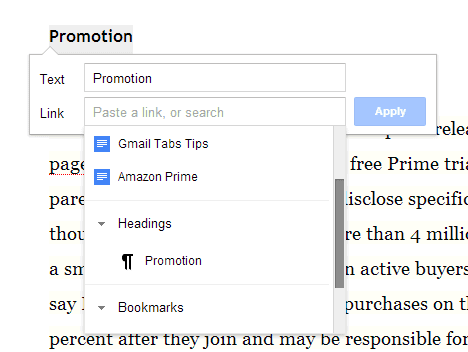
I've always wanted a tool that lets you highlight a text and quickly link to the top search results for that text. Now this feature is available in Google Docs and Google Slides: select some text, right-click and select "Link". Then you can pick one of top Google search results, one of your other documents or the headings/bookmarks that match the text selection.


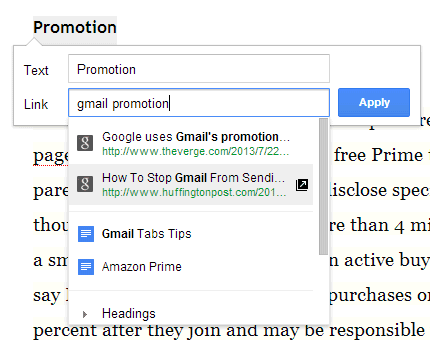
Type something in the "link" box and Google will show results for the new text:


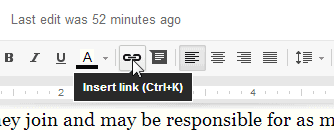
You can also use the keyboard shortcut (Ctrl+K) or use the link button from the toolbar.


{ via Google Drive's Google+ page }

Baca Selengkapnya ....

Google Showcases In-depth News Articles

Posted by Unknown 0 komentar
If you search for a broad topic like [love], [global warming], [censorship], [North Korea], Google shows 3 in-depth news articles at the bottom of the first search results pages. It's an effort to go beyond promoting recent news articles and reward news sites that write detailed articles and in-depth analyses.

Here's an example for [recession]: 3 long articles from Esquire, New York Times and Forbes.


The results for [amazon prime] include a Gizmodo article.


The results for [startups] include a TechCrunch article from April 2012 about the top startup ecosystems.


The first in-depth result for [cloud computing] is a 2007 Businessweek article about Google. It's called "Google and the Wisdom of Clouds".


"To understand a broad topic, sometimes you need more than a quick answer. Our research indicates perhaps 10% of people's daily information needs fit this category - topics like stem cell research, happiness, and love, to name just a few. (...) I'm happy to see people continue to invest in thoughtful in-depth content that will remain relevant for months or even years after publication. This is exactly what you'll find in the new feature. In addition to well-known publishers, you'll also find some great articles from lesser-known publications and blogs," says Google's Pandu Nayak.

There's a help center article that offers more information about this feature. "While the feature is based on algorithmic signals, there are steps you can take as a webmaster to help Google find your high-quality, in-depth content and best present it to users in the search." Google suggests to use schema.org article markup, Google authorship markup, logos and content that can be accessed without subscription.

Google News has a similar section that's called "spotlight", but it only includes recent news articles. "The Spotlight section of Google News is updated periodically with news and in-depth pieces of lasting value. These stories, which are automatically selected by our computer algorithms, include investigative journalism, opinion pieces, special-interest articles, and other stories of enduring appeal. To access the stories in this section, just click Spotlight on the left side of the page."


Baca Selengkapnya ....

MyScript Calculator

Posted by Unknown Senin, 05 Agustus 2013 0 komentar

Have you ever wanted to just solve your Math problems by just writhing them down on a paper or wanted to easy With MyScript© Calculator, perform mathematical operations naturally using your handwriting.


Specially designed for Android devices.
Easy, simple and intuitive, just write the mathematical expression on the screen then let MyScript technology perform its magic converting symbols and numbers to digital text and delivering the result in real time.

The same experience as writing on paper with the advantages of a digital device (Scratch-outs, results in real time, …).
Solve mathematical equations by hand without actually having to crunch the numbers yourself
BENEFITS AND FEATURES
- Works on your smartphone (Use your finger or a capacitive stylus with your android phone (Samsung Galaxy phones, HTC, Motorola, Sony Xperia, LG Optimus and others)
- Works on your tablet (Take advantage of the S-Pen with your Galaxy Note, or use any capacitive pen with your Galaxy Tab family of tablets, HTC flyer, Lenovo Thinkpad, Asus transformer and others)
- Use your handwriting to write any arithmetic formula
- Write and calculate mathematical expressions in an intuitive and natural way with no keyboard
- Scratch-out gestures to easily delete symbols and numbers
- Portrait and landscape operation
- Redo and undo functions.
SUPPORTED OPERATORS
Basic operations: +, -, x, ÷, +/‒, 1/x
Misc. Operations: %, √, x!, |x|
Powers/Exponentials: ℯx, xy , x2
Brackets: ( )
Trigonometry: cos, sin, tan
Inverse trigonometry: acos, asin, atan
Logarithms: ln , log
Constants: π, ℯ, Phi.

Download Links


Baca Selengkapnya ....

Samsung Galaxy Restore: Restore Data from Samsung Galaxy

Posted by Unknown 0 komentar
Samsung Galaxy is a series of mobile computing smart phones, tablets, and tablet phone produced by Samsung Electronics, all of which use the Android operating system. From June 2009 when the first smart phone for Galaxy Series - i7500 was released, Samsung released a lot of marvelous devices which are popular among users, like Samsung Galaxy S4, Samsung Galaxy S 2, Samsung Galaxy S 3, Samsung Galaxy Tab, samsung Galaxy Nexus, Samsung Galaxy Note.
There may tons of reasons causing you lost your Samsung Galaxy data. Here are some common ones I picked:

  • a. The USB disconnected accidentally when you are transferring data from your Samsung Galaxy to computer.
  • b. Your machines power off suddenly when you are using them.
  • c. When you connect your Samsung Galaxy to your computer which is infected by virus, you may lose your data.
When you meet the situations above, don't panic. It is definitely sure that you can restore Samsung Galaxy data by using Samsung Galaxy Restore (Tenorshare Android Data Recovery). It is a professional data restore program that is able to restore deleted, lost contacts, messages, videos, photos, songs and other files from Samsung Galaxy and any other smart phones.

Below are the easy instructions on how to restore data from Samsung Galaxy. (First of all, you should stop taking more photos with your Samsung Galaxy in case the previous files are overwritten):

How to Restore Samsung Galaxy in Windows 8, 7, Vista or XP?

Step 1: Connect Samsung Galaxy Device to PC

Download Android Data Recovery and connect your Samsung Galaxy to your computer via a USB cable. Android Data Recovery Trail


 Step 2: Enable USB Debugging & Turn on USB Storage

Before scanning, you should enable USB debugging and turn on USB storage. This software provides easy guide on how to do it on its screen. After settings, click "Next".


Step 3: Start to Scan Lost Files on Samsung Galaxy

Click “Allow” on your Samsung Glaxy to allow the program super user authorization. Then click “Start” on the software screen.

Step 4: Restore Files from Samsung Galaxy

When scanning completes, all the lost and existing files on Samsung Galaxy device are listed. Preview them and select the ones you need to recover. Navigate a path on your computer to save the recovered files

 Tenhorshare Android Data Recovery


Baca Selengkapnya ....
Trik SEO Terbaru support Online Shop Baju Wanita - Original design by Bamz | Copyright of android ipad.