AC!D Audio Technology v2.0 for CM9 Based

Posted by Unknown Sabtu, 03 November 2012 0 komentar
AC!D Audio Technology v2.0

GINGERBREAD IS NOT SUPPORTED
Be sure you are on a CYANOGEN (9-10) or AOKP based ROM (if it's not the case you may end in bootloop)


This MOD is Specially build to enhance sound quality on Your headset, earphone, headphone and on your speaker.

You'll have overall better Bass
A better sound quality (specially on basic headset)
An overall clearer sound (less distortion and bad noise)
A better compatibility with good headphone (special preset for headphone)
No more bad sound on speaker, sound will be clear and volume higher on some device
really better sound on video recording
more sound frequencies for a better experience

Ported several audio technology:
- Beats Audio by Dr Dre (Powerfull bass)
- Clearbass Sound by Sony (Clear Bass)
- Xloud by SonyEricsson (higher sound volume and clearer sound on speaker)
- Dolby Digital Sound (Equalizer enhancer bass setting and Surround setting)
- Surround Sound (Deeper bass and reduction of bass distortion plus Eq setting support)
- Alsa by Walkman (Audio resampling and driver activation for android phone)
- Dynamic Bass by Walkman (more Bass frequence and better bass support)
- DSP Manager by Cyanogen Team (Eq setting support overall more powerfull sound)
- Audio resampling from Sony Xperia T (NEW!)
- Clearbass audio setting from Xperia T (NEW! Bass even clearer and deeper than before!)
- Sony Walkman Player ( NEW! now with Xperia V style!)


Download AC!D Audio Technology v2.0 :

Mediafire  |  Free Direct Link

How to Install AC!D Audio Technology v2.0 :

1. Download UltimateSound from the link above
2. Download Walkman player addon (only if you need it)
3. Put it in your SDCard
4. COPY audio_effect.conf file located in system/etc into your SDcard (you might

    need this file in case of no sound issue)
5. Reboot into Recovery
6. BACKUP your System!!!
7. If you flashed any of previous soundmod release reflash your ROM or restore a

    backup without any SoundMOD (only way to be sure there is on issue at all)
8. Flash UltimateSound.
9. Reboot


"In case of bootloop restore your backup"
"If you don't have any Sound try replacing audio_effect.conf located in system/etc by the one you saved previously" Once rebooted check if following lines have been added to your build.prop:


Code:
#XSIncredibleBass config by R-ik
ro.semc.xloud.supported=true
persist.service.xloud.enable=1
ro.semc.sound_effects_enabled=true
#ALSA Driver Activation
af.resampler.quality=255
(if it's not the case do it manually)
Reboot
Done, Enjoy the awesomeness of Music!

Baca Selengkapnya ....

How to Boost your Android Phone Performance Part 4

Posted by Unknown Sabtu, 27 Oktober 2012 0 komentar
 How to Boost your Android Phone Performance Part 4 using Adrenaline Boost
 
This script (Adrenaline Boost) act like an nitro boost for your Android Phone.
It helps you to clear your system cache, get more free ram for you and gravely boost your phone's performance !


How it works?
Your phone's ram usage will get higher and higher everyday then you will find your phone become an @ss because it's turtle speed and only reboot fix this problem.
Our android os create system cache everyday, but after one day or so, those old caches are not longer in use but the os continuously create newer cache that's why the ram get heavier and heavier everyday !
Adrenaline Boost help you to clear those caches ! So you won't have to reboot again !


Screenshot :
Before Memory Free : 44.1172 MB
After Memory Free : 95.9102 MB
Memory Freed : 51.793 MB

What you need:
Properly Rooted Device

Terminal Emulator (Available in Google Play Store)

How To Install ?
1) Download from the attachment below
2) Put into your sdcard
3) Reboot into CWM
4) Mounts /system
5) Flash it
6) Reboot


How to Use It?
1) Open terminal emulator
2) Type :

Code:
su
boost
 Download :
Adrenaline_Boost_V1.zip  Mediafire | Free Direct Link
Adrenaline_Boost_V2.zip  Mediafire | Free Direct Link
Adrenaline_Boost_V3.zip  Mediafire | Free Direct Link


How to uninstall ?
Reboot cwm, mount /system and install THIS (Mediafire | Free Direct Link) from sdcard. 


More tweaks:
Part 1
Part 2
Part 3  

Baca Selengkapnya ....

Better way of hacking Android Games

Posted by Unknown Senin, 15 Oktober 2012 0 komentar
Hey guys, after my examination, i wish to share a better app of hacking Android games than GameCIH, which i have introduced to you in my previous post.

1. Download Game Guardian from here.

2. Install it.

3. Open it before you want to hack any game.

4. Open the game you wish to hack.

5. Press the game guardian icon somewhere in your phone's screen.

6. Press the 'Search' button.

7. Enter your initial value which is '0' in the following video. And wait for it to finish searching.

8. If you are hacking for gold(for example), do something that will alter the value of your gold, in the 
    following video, the guy play 1 level in order to increase his gold value from 0 to 1014.

9. After changing your value, press the Game Guardian icon and press again 'Search' button.

10. Now, enter the new value of your gold, and see whether there is only 1 searched result or not.

11. If the number searched result is more than 1, then please repeat process from step 8 to step 10 
      until you get only 1 searched result.

12. That's what we want, HOLD the searched result, and a window will pop up, enter the value you 
      wish your gold to be, for example 999999.

13. See, your gold value is now hacked to 999999.

14. Any question please refer to the following video.

DISCLAIMER: I do not own anything from the following video, I just share it from another website, 
                          thanks.


15. Thanks for watching, here's my facebook page, like it if you think i do really help 
      you, thanks.


Baca Selengkapnya ....

How to Paste Text on a Samsung Galaxy S3

Posted by Unknown Selasa, 02 Oktober 2012 0 komentar

How to Paste Text on a Samsung Galaxy S3

In a recent guide I showed you how to "copy on a Samsung Galaxy S3" it now makes sense to show you how to use the copied text to paste it in an e-mail, a text or even a forum post.

The first part is to go to the place where you want to past it. For this example I've decided to use an E-mail though you can genuinely use it pretty much that everywhere where you can find an input screen (the white screen you type into).

After finding where you want to post it you hold your finger in to the input
area (as you can see in the screenshot on the right). After holding your finger there for a second or two you will be given two options you can either "Paste" or "Clipboard". If you click "Paste" it will paste the last thing you selected to copy, if however you selected Clipboard you will be shown number of options from which to select.

As you can see in the image to the left you can select any of the items from the clipboard, this allows you, for example, to copy and paste several different things easily and when you want.


Original post link

Baca Selengkapnya ....

Connecting a Samsung Galaxy S3 Smartphone to Wifi

Posted by Unknown 0 komentar
One of the greatest features of modern smartphones is the fact the phones can be connected to Wi-Fi effectively giving you unlimited internet on your phone. Whether you're at work, at home or in somewhere like a Café you tend to be able to get access to a Wi-Fi system somewhere. So it seems to make sense to do a guide to show you how to connect to a Wi-Fi system on a Samsung Galaxy S3.

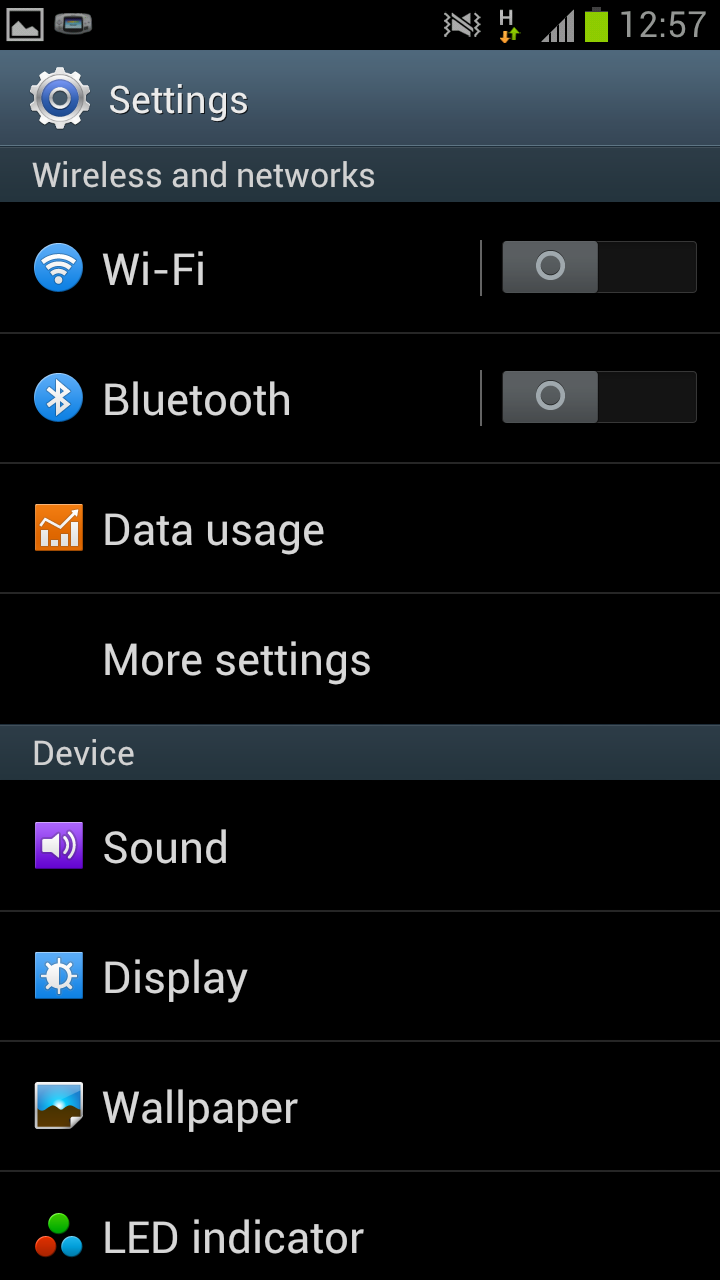
Firstly you need to go to the phones home screen then press the menu button. This will open up a menu like the one in the screenshot on the left. From this menu you need to select the bottom option "Settings".

After clicking on "Settings" you will see a huge list of options allowing you to change almost anything to do with the phone. Rather than scrolling up and down all the options you need to click on the "Wi-Fi". You will then be told to "Turn on the Wi-Fi". To do this you need to drag the grey circle beside "Wi-Fi" across until it turns into a green block.

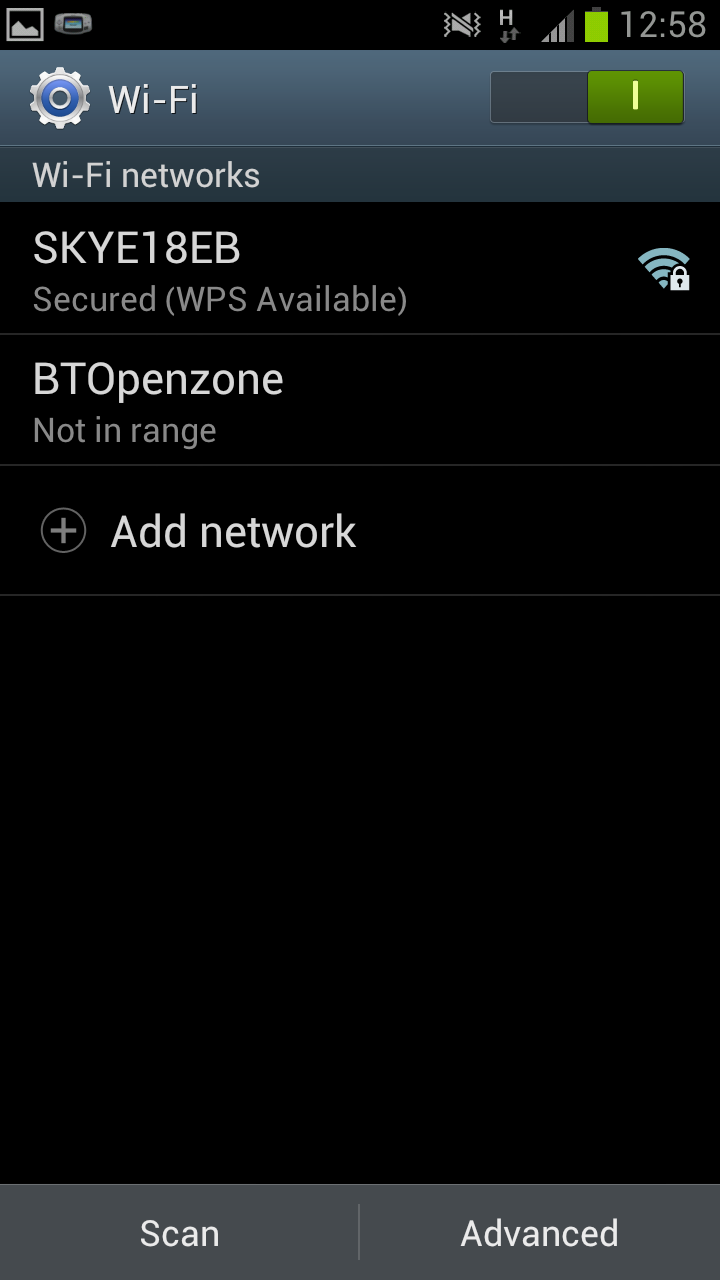
After turning on your Wi-Fi you again need to click "Wi-Fi" which should do an automatic scan of the area and give you a list of available Wi-Fi connections (as well as storing any you may have previously used). If the phone doesn't do an automatic scan you will need to to select scan from the bottom of the screen to prompt the phone into doing a scan.

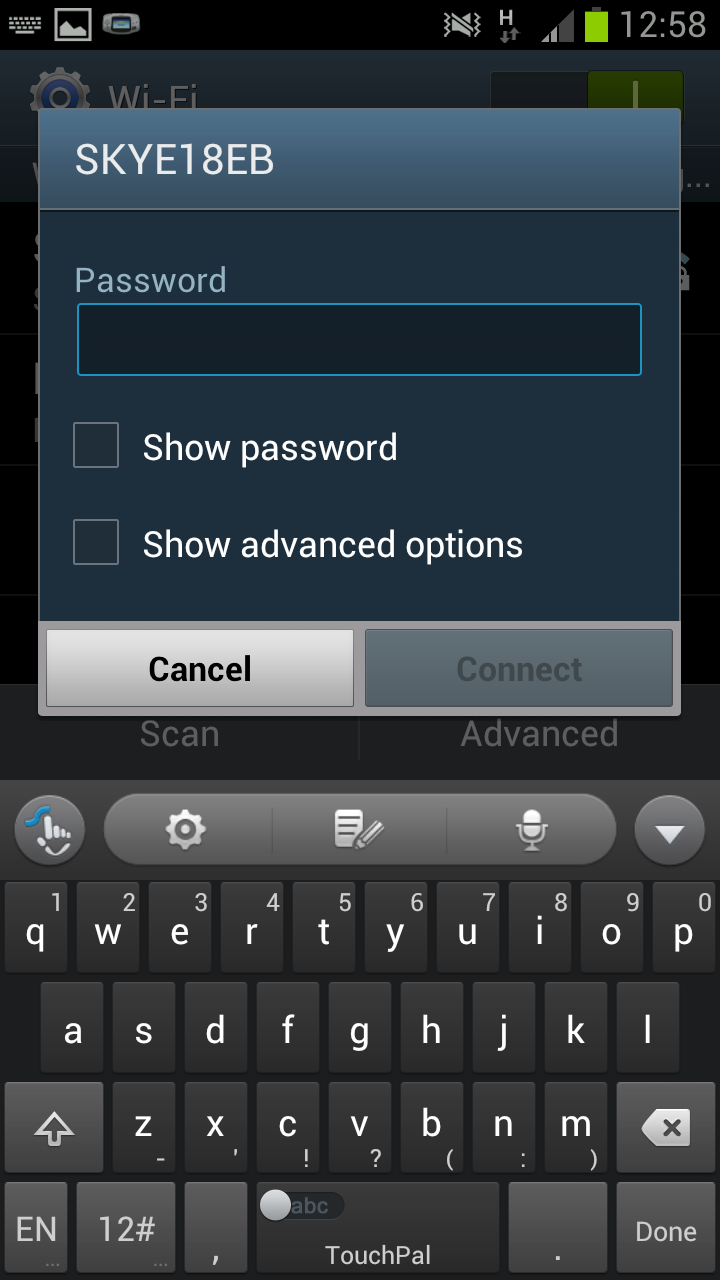
Hopefully when you were doing your scan you found the connection that you
are wishing to use, in my case the connection is the "SKYE18EB" connection, then click on that connection. If the connection then requires a password you will need to enter the password (see the screen shot on the right) an then click "connect".

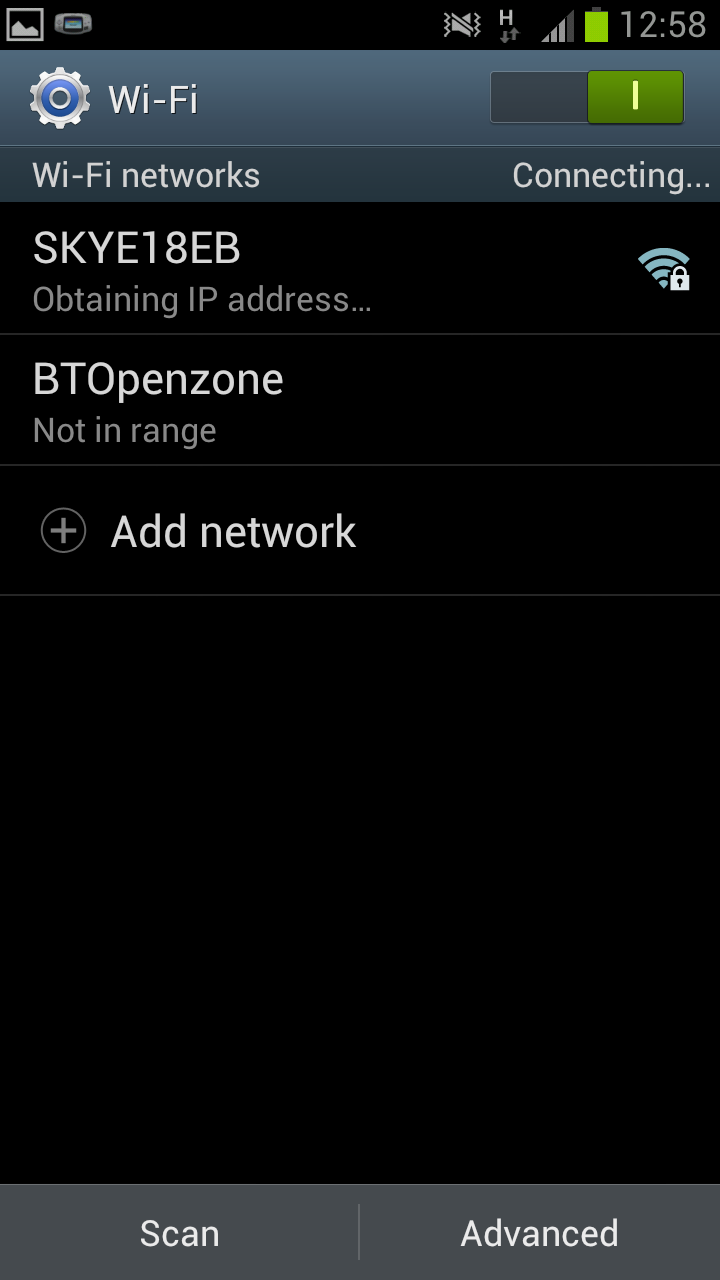
After clicking on connect the connection should authenticate (if you enter the correct password) and then obtain an IP Address. After this has been done you should be able to connect to that connection at will (as long as it's in range). With your Wi-Fi connected you will be able to surf the net, watch videos, use facebook/twitter and anything else you would want to do online, often with a faster connection than the one you'd have via mobile internet.

Note-This guide should work with pretty much all phones running Android 4.0.4.


See also

Baca Selengkapnya ....

How to access the test menu on a Samsung Galaxy S3

Posted by Unknown 0 komentar


Despite the Samsung Galaxy S3 being a brand new piece of kit which has only been out for a matter of months, some people will have had issues with it. Thankfully Samsung have given us, the users, a chance to test the various features of our phones via their in built "Test menu", a feature that allows us to check that pretty much every part of our phone works in the correct manner.


 To access the test menu on the Samsung Galaxy S3 you need to open "Phone" app and dial "*#0*#". As soon as you dial the second "#" you will be taken to the Test menu (see the screenshot on the right) which allows you to test many of the features of the phone (as you can see on the right hand side).

Whilst many of the tests are rather complex, or boring a few of them are very interesting and useful. For example the "Touch" test gives you a chance to test that the touch screen works thoroughly, in fact even allows you to "pass" the test.

Despite some of the test being useful, I am a little bit perplexed as to how the "Sensor" test manages to, once again, feature this rather horrifying dog (which was also used in the Samsung Galaxy S3 in a similar manner). Despite it's haunting eyes the dog seems to serve little real purpose.

Whilst I hope no one needs to test their Samsung Galaxy S3 I assume that many will. This allows users to check if the fault is a hardware fault (for example an area of the screen that might be dead) or just an app that isn't working properly, so make sure to test the phone via the menu before taking it to the store.

Link to original post

Baca Selengkapnya ....

How to open Excel files on phone or Tablet (Android)

Posted by Unknown 0 komentar


Now there are lot of mobile phones, tablet PC are available in market, technology is increasing in day by day.now a days mobiles are just like a microcomputer. In this article help you to open excel files on your phone or Tablet (Android).


Documents to Go
  • Documents to Go is a android application which Supported file formats include .doc,. docx,. xls,. xlsx,. ppt,. pptx etc.
  •  Includes password protected Word and Excel
  • Google Docs Download, it can view and edit your files from Google Docs directly
  •  Supported languages : English, French, Japanese, Italian, German, Spanish, Portuguese, Brazilian Portuguese,Turkish, Russian, Polish, Czech and Arabic and traditional and simplified Chinese.
  • Send & receive attachments via Gmail and other e-mail applications.
  • Very user friendly.
  • It includes rich formatting features like bold, italics, underline, font color, alignment, bulleted & numbered lists, tables, bookmarks, comments, footnotes, endnotes, track-changes, word count, find and replace, etc.
  • Sheet To Go offers powerful data computation with support for 111 functions, cell, number & sheet formatting, row & column preferences, auto-fit options, freeze panes, sort, cut, copy, paste, undo, redo, charting, etc.
  • Slideshow features is also included in it
  • PDF To Go provides high-fidelity viewing of important reference materials with options for page view, word wrap, auto-rotate, bookmarks, search, select and copy text, and more…
  • sync files to Computer via USB.
  • Total access with support for attachments, memory card support, password-protected files, built-in file browser, and new Live Folder for recently used documents

To the original post 

Baca Selengkapnya ....
Trik SEO Terbaru support Online Shop Baju Wanita - Original design by Bamz | Copyright of android ipad.