Chrome's App Launcher, Ready for Windows

Posted by Unknown Jumat, 19 Juli 2013 0 komentar
Google has yet to officially launch the Chrome app launcher, but there's a simple way to get the launcher right now if you use Windows: go to this page and click "Get the launcher" (the link only works in Chrome for Windows). If you're not signed in to Chrome, you'll need to do that. Probably Google uses Chrome's sync feature to enable the launcher.

Chrome adds a new icon to the taskbar and a new desktop shortcut, at least in Windows. The launcher shows all the apps that are also displayed in Chrome's new tab page. It also shows a search box that lets you quickly launch an app.
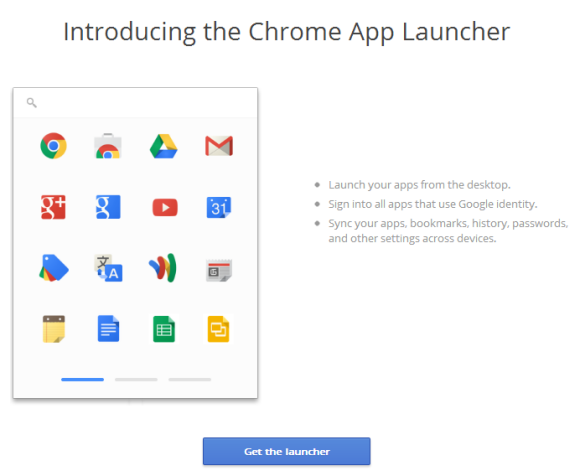
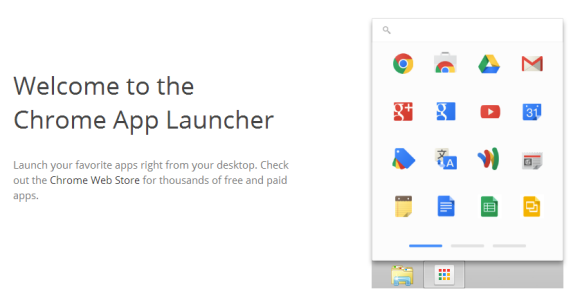

Engadget reports that the app launcher has been automatically added for some users. "On our own PCs, the installation placed the launcher app on the start page, taskbar and desktop for Windows 8 and in Windows 7's menu bar."
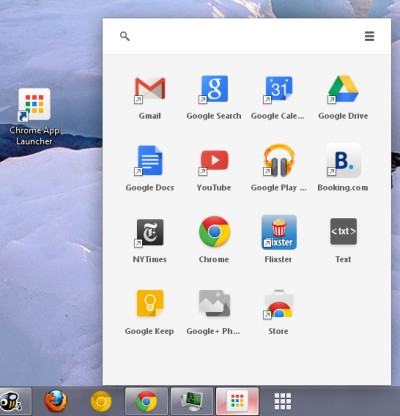

Chrome's launcher is connected to the new-style Chrome apps. Google wants to move from the old apps that were mostly bookmarks to some new apps that work offline, use powerful APIs that integrate with web services and devices like USB drives and Bluetooth speakers.

Some examples of new-style Chrome apps: Google Keep and Google+ Photos. Both apps work offline, while Google+ Photos automatically uploads the photos from an SD card. More examples here.

It's interesting that Chrome's Web Store is now all about apps. Extensions and themes are still available, but you need to explicitly click "extensions" or "themes" to find them. They're no longer promoted on the homepage and search results show the apps first.

{ via Engadget. Thanks, Florian K. }

Baca Selengkapnya ....

Try the New Google Maps (No Invitation Required)

Posted by Unknown 0 komentar
You can now use the new Google Maps interface without requesting an invite. That's a great news, even though invitations weren't hard to get.

You first need to go to maps.google.com/preview and click "Try Now". Google explains that "the new Google Maps draws you a tailored map for every search and click you make. So whatever you're trying to find or wherever you're trying to go, you'll always have a map highlighting the things that matter most."

So what happens after clicking "Try Now"? You see this message: "Sign in with your Google Account to try the new Google Maps."


While search results are better if you are signed in and you also use Google+, it's strange to see that you need to sign in. After all, the mobile apps for Google Maps work even when you're not signed in.

After signing in, Google shows another message: "Almost there... During this preview, we may email you with product updates or to request your feedback. Please let us know what you think!"


Then you can finally use the new Google Maps.


You can sign out and Google Maps will continue to work.

I hope that the new Google Maps won't require a Google Account (or Google+) when it will replace the existing interface. Just like Google Search, Google Maps works well even when it doesn't return personalized results. Google found a way to personalize search results when you're not logged in, maybe Google Maps will do the same.

Baca Selengkapnya ....

Full-screen Gmail Compose Box

Posted by Unknown 0 komentar
There are plenty of shortcuts for opening Gmail's compose box in a new tab or a new window. Not many people use keyboard shortcuts and opening the box in a new page is awkward, so Google decided to add an inline full-screen option.


It's not exactly full-screen, it's more like a maximized box that still lets you see your labels and your chat contacts. You can manually enable the "full-screen" mode every time you want to use it or set is as the default option.

"When this option is enabled, the compose window is centered in your inbox and expands to fit on your screen. In addition, the formatting toolbar is on by default. You can click on the expand button in the top right to switch to full-screen or set full-screen as the default by selecting Default to full-screen in the more options menu in the bottom right," informs Google.

There's a help center article that provides more information:

"Compose messages in a window that's right for you. The default is a small compose window that's great for checking other emails as you type and getting things done quickly. If you prefer a larger window, you can switch to full-screen when you need it, or set full-screen as default."

It turns out that the new expand button for the full-screen mode replaces the pop-out button, which opened the compose box in a new window. To open the box in a new window, you now need to shift-click the expand button.

The full-screen mode also works when you reply to a message, but it's more cumbersome to use. "To compose in a larger window, click the Recipient arrow next to the recipient's name and select Pop out reply. Once you've popped out the reply, click the expand icon expand to compose in full-screen."

As usual, this feature is gradually rolling out to all Gmail accounts, so check back later if you don't see it right away. Obviously, this only works in the new compose interface.

Baca Selengkapnya ....

Change Chrome's Search Engine to Google.com

Posted by Unknown 0 komentar
Two years ago, I wrote a post that explained how to change the domain used by Chrome when performing a Google search from the omnibox. The trick still works (thanks, Peter Kasting!), but there's a much simpler way to change the Google domain used by Chrome's omnibox from google.tld (your local Google domain) to google.com.

This is only useful if you're not in the US and you'd like to use google.com to see the latest Google features. The nice thing is that it works in the desktop Chrome, in Chrome for Android and Chrome for iOS.

1. Type google.com/ncr in the address bar and search for something (use Google's search box, not the browser's omnibox).

2. Close Chrome. If you're using the desktop Chrome, close all Chrome windows or click Exit in the menu. If you're using the mobile Chrome, press the home button and use your operating system's multitasking feature to force close Chrome. Here are the instructions for iOS. Android instructions are different, depending on the device you use: some Android devices have a button that shows a list of recent apps, while others require to press and hold the home button or double-tap it. Swipe Chrome's thumbnail to force close it.

3. Launch Chrome again, open a new tab and search for something using Chrome's omnibox.

4. You should see an infobar that asks you: "would you like to search with google.com instead of [your local Google domain]?". Click or tap "switch to google.com" and that's all.


The screenshot is from a Nexus 7, but this should work in Windows, Mac OS, Linux, Android and iOS. Here's a similar screenshot from Chrome for Windows:


You'll also see google.com instead of your local Google domain in Chrome's settings (this feature is not available in Chrome for iOS).


To go back to your local Google domain, you can use similar instructions. Visit google.tld (replace this with your country's Google domain), search for something, restart the browser, search using Chrome's omnibox and click "switch to google.tld" in the infobar that should show up.

{ Thanks, Sushubh Mittal and Jérôme Flipo. }

Baca Selengkapnya ....

From clipping to clicking – new research looks at the future of coupons

Posted by Unknown Kamis, 18 Juli 2013 0 komentar
For a generation, clip-and-save coupons in freestanding newspaper inserts (FSIs) were the norm for shoppers. But with the introduction of downloadable, print-at-home, and digital coupons in recent years, shoppers today have a whole new array of options to receive and redeem better, more relevant discount offers -- whether at home or on the go. Internet marketing research firm eMarketer estimates that mobile coupon users will grow to 53.2 million by 2014.

Zavers by Google, the digital coupon solution that delivers relevant discount offers to shoppers on their desktops and mobile devices, completed a study with Shopper Sciences to dive into the current state of couponing, the potential of digital and mobile couponing, and to provide guidance in developing a strategy for the future.  

The Zavers study found that while women and moms have traditionally been the typical coupon user, men are quickly catching up -- now representing about a third of all coupon users across all categories.

Millennials also signify an expanding segment of the digital coupon market. According to our research, Millennials are more likely to use a mobile device to receive a percentage-off discount than any other age group. Millennials are also more likely to embrace digital solutions that help them manage coupons and offers.

Finally, our studies revealed that more than 40% of shoppers have left a retail store without purchasing because they knew they left a coupon at home. 54% percent of shoppers said that the ability to load digital coupons to a loyalty card or personal identifier (such as a smart phone) was “very” or “extremely useful.”  The data suggests that consumers value the ability to easily access their coupons whenever and wherever they are.

There are three key things that retailers and manufacturers can do to create a winning couponing program in the digital age:

1. Recognize the Zero Moment of Truth (ZMOT) -- the moment when a shopper is searching online for products and information -- as a key opportunity for delivering relevant and tailored coupons.
2. Set up cloud-based redemption and reconciliation so coupons can be tracked and cleared in real time and promotions can be evaluated and adjusted quickly.
3. Understand your customer purchase habits and reward your best customers with motivating incentives.

Preview the below to learn more about the Zavers by Google coupon study, or download the complete white paper.


Posted by Jenny Liu, Product Marketing Manager, Zavers by Google

Baca Selengkapnya ....

YouTube Tests Center-Aligned Layout

Posted by Unknown Rabu, 17 Juli 2013 0 komentar
Nedas Petravičius spotted a new YouTube experiment that changes the user interface: there's a bigger sidebar that's now overlaid, the Dashboard/Video Manager/Analytics menu has been moved to the right corner of the page and the Upload button is blue. YouTube now shows the same sidebar from the homepage on video pages, so you no longer see a list of suggested videos.

The biggest change is that the video page is now centered. YouTube's pages used to be centered, but they're now aligned to the left, ever since YouTube redesigned the pages and added the sidebar guide. There are many extensions and scripts that center the pages.


The new sidebar has a lot in common with the Google+ sidebar. There are some differences: you need to click the menu icon to display/hide the sidebar and the sidebar continues to be displayed when you click one of its options.


Since the sidebar is hidden by default, there's more room for your favorite videos:


This drop-down menu is placed next to the upload button in the regular interface:


Here's a video:


Here's how you can enable the experimental feature. If you use Chrome, Firefox, Opera, Safari or Internet Explorer 8+:

1. open youtube.com in a new tab

2. load your browser's developer console:

* Chrome/Opera 15 - press Ctrl+Shift+J for Windows/Linux/ChromeOS or Command-Option-J for Mac

* Firefox - press Ctrl+Shift+K for Windows/Linux or Command-Option-K for Mac

* Opera 12 - press Ctrl+Shift+I for Windows/Linux or Command-Option-I for Mac, then click "Console"

* Safari - check this article

* Internet Explorer - press F12 and select the "Console" tab.

3. paste the following code which changes a YouTube cookie:

document.cookie="VISITOR_INFO1_LIVE=ULHzU8CeVLo; path=/; domain=.youtube.com";window.location.reload();

4. press Enter and close the console.

To go back to the regular interface, use the same instructions, but replace the code from step 3 with this one:

document.cookie="VISITOR_INFO1_LIVE=; path=/; domain=.youtube.com";window.location.reload();

{ Thanks, Nedas. }

Baca Selengkapnya ....

Google Maps for iPad

Posted by Unknown 0 komentar
Almost one year after Google Maps was removed from iOS and 7 months after Google released a Maps app for iPhone, you can finally install the Google Maps app on an iPad and actually use it. Installing the iPhone app on an iPad wasn't a good idea, so the web app was a good alternative.

It's interesting to notice that the new Maps UI was first included in the Google Maps for iPhone. After that, Google used it in Google Maps Engine Lite, then in the new desktop Google Maps, in the updated app for Android and now the circle is closed.

The updated Google Maps app for iPhone and iPad looks just like the Android app and has almost the same features: incident reporting, dynamic rerouting, integration with Zagat and Google Offers, Google+ recommendations, the "explore" feature that lets you find great places without searching for them, biking directions and navigation, offline maps (type OK maps in the search box).

To open the "explore" section, tap the search box and select "explore". Then you can tap "eat", "drink", "shop", "play" or "sleep" and find a lot of useful suggestions. Many of them are influenced by the reviews of the people from your Google+ circles.


The full-screen map provides an immersive experience.


There's support for incident reports, although it's not clear if the new feature has anything to do with the Waze acquisition.


Google Maps still supports layers, but not all the layers from the old Android app. There are layers for traffic, public transit, bicycling and satellite maps.


When you first launch the app, Google Maps shows the following screen. The option to improve Google Maps by sharing anonymous location data is enabled by default. This means that Google no longer has to rely on Android devices to get traffic data. A similar option was displayed last year, when Google Maps for iOS was launched, so it's not new.


A year ago, things were very different: Google Maps for Android was a lot more powerful than the built-in Maps app for iOS powered by Google Maps data. Now Google Maps apps for Android and iOS have almost the same features. Can you find some features that are only available in the Android app?

Baca Selengkapnya ....
Trik SEO Terbaru support Online Shop Baju Wanita - Original design by Bamz | Copyright of android ipad.